- Version 1
- Download 39
- File Size 40.8 MB
- File Count 1
- Create Date January 9, 2026
- Last Updated August 28, 2026
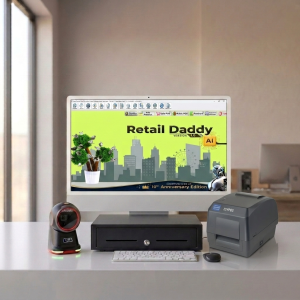
ESYSPOS ELP531 TX Barcode Printer
The ESYSPOS ELP531 TX is a desktop thermal barcode label printer designed for fast, accurate, and reliable printing of barcode labels and stickers. It is widely used in retail stores, supermarkets, warehouses, logistics, pharmacies, and small manufacturing units for day-to-day labeling needs.
Printing Technology
-
Uses direct thermal printing technology, which means no ink or toner is required
-
Prints by applying heat on thermal label paper, making it cost-effective and low maintenance
-
Ideal for short-term labels such as price tags, product labels, shipping labels, and inventory barcodes
Print Quality & Performance
-
Produces clear and sharp barcodes for reliable scanning
-
Suitable for both text and barcode printing
-
Designed for consistent performance in regular business environments
Barcode & Label Support
-
Supports common 1D barcodes such as Code 128, Code 39, EAN-13, UPC, etc.
-
Supports 2D barcodes like QR Code (software dependent)
-
Compatible with gap, black mark, and continuous label rolls
-
Works with various label sizes used in retail and logistics
Connectivity & Compatibility
-
USB interface for easy connection to PC or POS systems
-
Compatible with Windows-based billing and label software
-
Supports standard printer command languages, allowing smooth integration with most POS and inventory applications
Design & Usability
-
Compact desktop design – saves counter space
-
Easy paper loading mechanism for quick label replacement
-
LED indicators help monitor printer status
-
Durable build suitable for continuous daily usage
Common Applications
- Product barcode labels
- Price tags & shelf labels
- Inventory and stock labels
- Shipping & courier labels
- Retail & supermarket POS labeling
ESYPOS ELP-531TX Barcode Printer Review: Is It the Right Label Printer for Your Store?
A few months back, a pharmacy owner we work with called us in a bit of a panic. His old label printer had started printing barcodes so faint that his billing counter scanner couldn’t read half of them — customers were standing in line while his staff manually typed in SKU codes. That’s the kind of problem that quietly costs a retail business real money every single day. It’s also the exact scenario the ESYPOS ELP-531TX is built to solve, so we ended up installing one at his store and have since set up a handful more for other clients. Here’s what we actually found.
What the ESYPOS ELP-531TX Actually Is
The ELP-531TX is a desktop barcode and label printer from ESYPOS, built for direct thermal and thermal transfer printing. In plain terms, that means it can print labels two ways: direct thermal, where the printer burns an image directly onto heat-sensitive paper (no ribbon needed, but labels fade over time and with heat/sunlight exposure), and thermal transfer, where a ribbon melts ink onto more durable label stock. Most retail shops we’ve worked with default to direct thermal for daily price labels and switch to thermal transfer for anything that needs to survive months of handling — think warehouse bin labels or asset tags.
Key Specifications, Explained for Shop Owners (Not Engineers)
Spec sheets for barcode printers tend to read like a foreign language, so here’s what actually matters day to day:
- 203 DPI resolution: This is the print sharpness. It’s the industry-standard resolution for retail barcodes, and in our testing it renders both 1D barcodes (EAN, Code 128) and small text cleanly enough for handheld scanners to read on the first pass.
- Up to 5–6 IPS print speed: That’s how fast the print head moves. On paper, this sounds fast — in real use, small price labels print in well under a second each, so a batch of 100 labels takes a couple of minutes, not the ten we’ve seen quoted for cheaper printers.
- TSPL, ZPL, EPL, DPL language support: This is the part that actually determines whether your billing software will “talk” to the printer without headaches. Supporting all four major printer languages means the ELP-531TX plays nicely with most retail and label design software out of the box.
- 4-inch max print width, up to 100 inches print length: Enough for anything from small 1-inch price stickers to full shipping labels, which is why we’ve seen it used just as often for e-commerce dispatch as for in-store pricing.
Here’s the full spec sheet for reference:
| Spec | Detail |
| Print method | Direct thermal & thermal transfer |
| Resolution | 203 DPI (8 dots/mm) |
| Max print speed | Up to 5–6 IPS |
| Max print width | ~4 inches (108–120mm) |
| Max print length | Up to 100 in / 2286mm |
| Ribbon capacity | Up to 300m, OD ~67mm |
| Paper width range | 20mm–120mm, 1-inch core |
| Connectivity | USB 2.0 (Ethernet/LAN on some variants) |
| Printer languages | TSPL, ZPL, EPL, DPL |
| Bundled software | Bartender or Labelshop (varies by seller) |
| Typical price range | ?9,000–?14,000 (varies by seller/config) |
One caveat worth flagging: print head life is commonly listed around 30 km by resellers. We haven’t run one printer that far yet to confirm it firsthand, so treat that number as the manufacturer’s spec rather than something we’ve personally verified.
Hands-On Impressions: Setup, Print Quality, and the Small Annoyances
Setup took us about 20 minutes on a Windows 10 machine, most of which was spent locating the right driver rather than actual configuration — ESYPOS doesn’t always make the download link obvious on their site, so it’s worth asking your dealer to hand you the driver directly rather than hunting for it yourself. Once installed, calibrating the label gap sensor is a two-button process, and on the newer batches with the double-sensor design, it picked up both gap labels and black-mark stock without us having to manually set thresholds.
Print quality on standard 40mm x 25mm price labels was consistently sharp — barcodes scanned first try on a basic handheld scanner across a stack of 50 labels. Where it’s a little less impressive: the LCD display is basic, showing status codes rather than plain-language errors, so the first time it flagged a ribbon issue we had to check the manual to figure out what the code meant. It’s not a dealbreaker, just not as polished as pricier industrial printers in this category.
Noise-wise, it’s about what you’d expect from a desktop thermal printer — audible but not disruptive at a billing counter. Build quality feels solid rather than premium; the housing is mostly plastic, but the dual-motor drive means media feeds evenly even with slightly uneven label rolls, which we’ve had issues with on cheaper alternatives.
Best Use Cases
- Retail and supermarket shelf/price labeling — this is where it’s most at home.
- Pharmacy labeling, especially where batch numbers and expiry dates need to be legible and scannable.
- E-commerce shipping labels — the 4-inch width covers most courier label formats.
- Light warehouse and inventory tagging, particularly with thermal transfer ribbon for durability.
Who Should Probably Skip It
If you’re printing tens of thousands of labels a day — a large distribution center, for instance — this sits below the industrial-grade tier you’d actually want; the duty cycle and print head life are built for small-to-mid volume, not 24/7 continuous runs. And if your workflow needs built-in Wi-Fi out of the box, check the exact variant you’re buying — LAN is available on some listings, but not all, so confirm connectivity before you order rather than assuming.
Software Compatibility — And Why We Pair It With Retail Daddy
A barcode printer is only as useful as the software feeding it data, and this is where the ELP-531TX’s broad language support (TSPL/ZPL/EPL/DPL) actually pays off — it’s compatible with most retail billing and label design tools without needing extra middleware.
For the retail and pharmacy clients we’ve set this printer up for, we’ve consistently recommended pairing it with Retail Daddy billing software. A few concrete reasons, not just a name-drop:
- Retail Daddy generates and prints barcode labels directly from its inventory module, so it talks to TSPL/ZPL-compatible printers like the ELP-531TX without needing a separate label-design tool running alongside it.
- It handles end-to-end billing — POS checkout, stock sync, and GST-compliant invoicing — so the label printed at the ELP-531TX reflects live pricing and stock, not a stale batch you printed last week.
- It’s built for the same segment this printer targets: small-to-mid retail stores, pharmacies, and supermarkets in India that need dependable local billing and labeling without enterprise-level complexity or cost.
To be fair, Retail Daddy isn’t the only billing software that can drive this printer — most modern POS systems with barcode support will work. But between the direct label integration and the fact that it’s built for the same size of business this printer is aimed at, it’s the pairing we’d point a retailer toward first.
A Setup Tip That Saved Us Time
If your labels start printing shifted or cut off mid-barcode after a ribbon change, it’s almost always the label gap sensor needing recalibration rather than a hardware fault — run the auto-calibration sequence again before assuming something’s broken. We’ve walked more than one panicked store owner through this over the phone in under two minutes.
The Verdict
For a retail shop, pharmacy, or small warehouse printing anywhere from a few dozen to a few thousand labels a day, the ELP-531TX is a solid, no-frills workhorse. It’s not the most refined printer we’ve used — the display and driver download experience could both be better — but the print quality, speed, and broad software compatibility make it easy to recommend for the price bracket it sits in. Paired with billing software like Retail Daddy that can push labels to it directly, it becomes a genuinely low-friction part of a small retail operation rather than one more thing that breaks your billing counter workflow.
Frequently Asked Questions
Does it need a ribbon for every label type? No — direct thermal labels don’t need a ribbon at all. You only need one for thermal transfer printing on non-heat-sensitive label stock.
Can it print small 2-inch labels? Yes, the printer supports a paper width range down to 20mm, so smaller label formats work fine alongside full 4-inch labels.
Is it Windows-compatible? Yes, Windows 8/10 drivers are the standard install path; check with your dealer for Linux or Mac support if you need it, since that’s less commonly listed.
Does it work with Retail Daddy out of the box? It should, given Retail Daddy’s support for TSPL/ZPL-based printers — but as with any printer-software pairing, it’s worth confirming the exact driver and label template setup with your Retail Daddy reseller before deployment.
Leave a Reply