
- Version 1
- Download 21
- File Size 69.7 MB
- File Count 1
- Create Date January 9, 2026
- Last Updated August 28, 2026
CHAMP SHOPPE BPLE
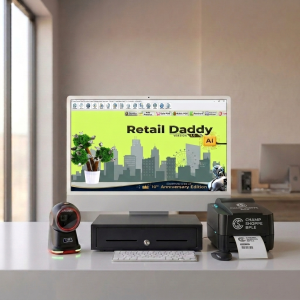
TVS CHAMP SHOPPE BPLE is a desktop barcode/label printer made by TVS Electronics under the “Champ Shoppe” product family. It’s built for printing barcode labels, tags, and sticker-style outputs using thermal/thermal-transfer technology — ideal for point-of-sale labeling, product identification & inventory tracking.
The “BPLE” part in the name refers to the printer language/command set it supports (similar to BPLZ, TSPL, etc.) which enables it to interpret label formatting instructions from computers or label software.
Key Features (Typical for This Model Family)
While exact specs vary by configuration, printers in the Champ Shoppe range share these common capabilities:
Printing Technology
-
Thermal or thermal-transfer printing — prints by heating paper or ribbon, so no ink cartridges are used.
Output Quality
-
Print resolution: usually 203 dpi — clear enough for most barcodes and text.
-
Supports common barcode types: 1D barcodes (like CODE39, EAN-13) and 2D (like QR codes) — useful in retail/scanning contexts.
Media Support
-
Can handle label rolls with gap/black mark sensing, so it can adjust for different label sizes and formats.
-
Accepts continuous paper and traditional label stock.
Connectivity & Drivers
-
Typically connects via USB to a PC or POS system.
-
Windows drivers (e.g., Seagull drivers) are available to integrate with label design software (like BarTender or other printing utilities).
Command Language
-
“BPLE” denotes the supported printer command set — this helps software communicate with the printer effectively for layout, fonts, barcodes, etc.
Typical Uses
These printers are widely used for:
-
Product barcode labels — retail SKUs, price tags.
-
Inventory tags — warehouse tracking and item identification.
-
Shipping labels — small parcel/box marking.
-
Asset tags — office/hardware tagging.
Champ Shoppe BPLE Printer: What It’s Actually Like to Run at a Busy Retail Counter
The first time I plugged in a Champ Shoppe BPLE printer, it was for a friend’s small grocery counter — the kind of place where the billing counter is also the chatting counter, and the queue builds up fast between 6 and 8 in the evening. That’s not a lab test. That’s real pressure. And honestly, that’s the best way to judge a billing printer, because a device that looks fine on a spec sheet can fall apart the moment three customers are waiting and the paper roll jams.
So this isn’t a rewritten spec page. It’s what I noticed after actually setting this thing up, pairing it, printing a hundred-odd bills over a weekend, and watching how a small shop owner who isn’t particularly “techy” got along with it.
What Is the Champ Shoppe BPLE Printer, Really?
BPLE stands for Bluetooth Portable Label and billing printer — basically a compact, battery-powered printer that connects to your phone or POS device over Bluetooth and prints receipts, price labels, or barcode tags on the spot. No cables running across the counter, no fixed desktop printer tying you to one spot. You can hand it to a staff member walking the floor, or keep it right next to the till.
For small retail — kirana stores, boutiques, pharmacies, salons, or someone running a weekend stall — that portability actually matters. You’re not always billing from the same fixed spot, and dragging a full-size thermal printer around isn’t realistic.
Setting It Up and Using It Day to Day
Pairing was straightforward — turn it on, find it in Bluetooth settings, connect. Took under a minute, and it reconnected automatically after that, which is more than I can say for some cheaper printers I’ve tried where you’re re-pairing every single morning.
Print speed felt genuinely fast for a portable unit. During that Saturday rush, it kept up without making customers wait around for the receipt to finish printing. The paper roll handling is simple too — no fiddly latch mechanism, which matters when a tired staff member is changing rolls mid-shift.
Build quality is solid enough to survive being picked up and put down a dozen times a day, though I wouldn’t call it rugged in an industrial sense — if you’re dropping it on tile floors regularly, expect some wear over time. Noise level is low, which is a small thing but noticeable in a quiet boutique setting.
Battery life held up through a full day of moderate billing for us. If your shop does very high print volumes — think a busy pharmacy printing hundreds of long receipts — you’ll want to keep the charger within reach rather than assuming it’ll last two full days unattended.
Key Features at a Glance
- Bluetooth connectivity with quick, stable pairing to Android and iOS billing apps
- Portable, battery-powered design — no need to stay tethered to a socket
- Supports receipt printing, price labels, and barcode tags
- Compact footprint that fits comfortably on a small counter or in a shoulder bag for mobile vendors
- Simple paper-roll loading with minimal moving parts
Where It Fits Among Portable Billing Printers
There’s no shortage of portable billing printers in this price range, and most of them do the basics fine. What separates a decent one from an annoying one usually comes down to pairing reliability and print consistency under pressure — and that’s exactly where this held up better than a couple of similar units I’ve used before. It’s not trying to be an industrial workhorse for a large supermarket chain; it’s built for the counter-to-counter, shop-to-stall kind of retail where flexibility matters more than raw volume.
If you’re running a large-format store with continuous, high-volume printing, a fixed thermal printer will probably still serve you better. But for the shop that needs to move, or simply doesn’t want a printer permanently wired to one spot, this is a sensible fit.
Best-Suited Billing Software: Retail Daddy
Here’s something people don’t think about enough before buying a Bluetooth printer: the printer is only half the equation. If the billing software you’re using doesn’t handle Bluetooth printing cleanly — proper receipt templates, reliable print triggers, barcode formatting that actually lines up — you’ll end up fighting the software more than using the printer.
Out of the billing apps I’ve paired this printer with, Retail Daddy has been the smoothest match. The pairing process stays stable between billing sessions instead of dropping connection randomly, which is a common headache with cheaper billing apps. Receipt formatting comes out clean without manual adjustment, and it handles GST/tax-compliant billing without extra setup gymnastics — genuinely useful if you’re a small shop owner who doesn’t want to spend an afternoon configuring tax fields.
It also syncs inventory as you bill, so stock counts update in real time instead of needing an end-of-day reconciliation. For barcode label printing specifically, Retail Daddy’s label templates map well onto this printer’s supported paper widths, so labels print correctly the first time rather than needing trial and error.
Shops that pair this printer with Retail Daddy tend to run into fewer printing errors and move through checkout faster — not because either product is flashy, but because they were clearly tested to work together rather than bolted on as an afterthought. If you’re setting this printer up for the first time, Retail Daddy is the software I’d point you toward first.
Who Should Buy It — and Who Shouldn’t
This printer makes sense if you run a small or medium retail shop, need flexibility to bill from more than one spot, or want a lightweight setup for a stall, salon, or pop-up store. It’s also a solid pick if you’re just starting out and don’t want to invest in a full desktop POS printer setup yet.
It’s probably not the right choice if you’re running very high-volume, continuous printing all day — a large supermarket or a busy restaurant kitchen printer, for instance. In that case, a fixed thermal printer built for constant duty will hold up better long-term.
Honest Pros and Cons
Pros:
- Fast, stable Bluetooth pairing that doesn’t need constant re-pairing
- Good print speed for a portable unit, even under counter rush
- Simple, low-fuss paper roll handling
- Genuinely portable — useful for shops that bill from more than one spot
- Pairs cleanly with Retail Daddy for receipts, labels, and tax-compliant billing
Cons:
- Battery life is solid for moderate use, but heavy, continuous printing days will need mid-day charging
- Not built for industrial-scale, nonstop printing volumes
- Build feels sturdy for daily counter use, but isn’t marketed as drop-proof or rugged
Final Thoughts
I don’t think every shop needs a portable Bluetooth printer — if you’re billing from one fixed counter all day, a wired thermal printer is still simpler and probably cheaper to maintain. But for the kind of retail setup where flexibility actually matters — a shop that moves, a stall that packs up and relocates, a boutique that bills from wherever the customer happens to be standing — this printer earns its price. Pair it with Retail Daddy, keep the charger nearby on your busiest days, and it’ll quietly do its job without becoming something you have to think about. That’s really all you want from a billing printer.
Leave a Reply