
- Version 1
- Download 2361
- File Size 7.2 MB
- File Count 1
- Create Date January 14, 2026
- Last Updated September 2, 2026
TVS RP3200 plus
The TVS RP 3200 Plus is a high-performance, 80mm (3-inch) thermal receipt printer designed to handle the rigorous demands of large-scale retail and hospitality businesses.
Short Description
-
Blazing Speed: Boasts a print speed of up to 200 mm/sec, significantly reducing customer wait times during peak hours.
-
Triple Connectivity: Comes standard with USB, Ethernet (LAN), and Serial interfaces, providing maximum flexibility for both standalone and networked setups.
-
Heavy-Duty Auto-Cutter: Equipped with a premium automatic cutter designed for 1.5 million clean cuts.
-
Superior Reliability: Features a long-life print head capable of printing up to 150 km, ensuring long-term durability in high-volume environments.
-
Smart Design: A stable, robust chassis with top-loading paper functionality for quick and easy roll replacements.
-
Wall Mount Support: Includes a design that can be wall-mounted, making it ideal for space-saving at billing counters or in kitchens.
Best For:
-
Hypermarkets & Department Stores: For non-stop, high-speed billing.
-
Restaurants (KOT): Perfect for kitchen orders due to its LAN connectivity and loud alert system.
-
Large Pharmacy Chains: For clear, professional-grade invoices and prescriptions.
TVS RP3200 Plus Review: Is This the Right Receipt Printer for Your Billing Counter?
It’s a Saturday evening, the store is packed, and the printer at the billing counter jams for the third time. The queue keeps growing. If you’ve run a retail shop for more than a few months, you already know this scene. A receipt printer isn’t glamorous, but a bad one can quietly wreck your peak-hour billing. The TVS RP3200 Plus is one of the printers I keep coming back to when store owners ask me what to put at their counter, and here’s an honest look at why.
What the RP3200 Plus Actually Is
The RP3200 Plus is a 3-inch direct thermal receipt printer from TVS Electronics. “Direct thermal” means there’s no ink cartridge or ribbon involved — the printer applies heat to specially coated paper, and the image appears. That’s one less consumable to manage, one less thing that runs out at the worst possible moment.
It’s built specifically for retail billing counters, restaurants, pharmacies, and similar high-footfall service points where speed matters more than fancy printing.
The Specs, and Why They Actually Matter
Most spec sheets read like a checklist nobody explains. Here’s what these numbers mean once the printer is sitting on your counter:
- Print speed: up to 200 mm/sec — this is the difference between a customer waiting two seconds for their bill versus fidgeting for ten. At peak hours, that adds up across dozens of transactions.
- Resolution: 203 DPI — sharp enough for clean text, barcodes, and small logos on the receipt without smudging.
- Max print width: 72 mm, on standard 80mm (±0.5mm) paper rolls — this is the industry-standard receipt size, so you won’t struggle to find paper locally.
- Triple interface: USB, Serial, and Ethernet — you can connect it directly to a billing PC over USB, or put it on your shop’s network via Ethernet if you’re running multiple counters. That flexibility matters more than people expect until they’re setting up a second till.
- Paper support: continuous or marked/pre-printed rolls, thickness 0.06mm–0.08mm — decent range if you want branded paper with your logo pre-printed.
- Cutting: full cut, partial cut, or tear-off — you can choose based on how your staff actually tear receipts; partial cut tends to reduce jams versus full cut on busy days.
- 4MB flash memory, print head rated for roughly 100 km of printing, and a cutter rated for about 1,000,000 cuts. In plain terms: this isn’t a printer built to die in a year. For a mid-volume shop, that head and cutter life should comfortably outlast several years of daily use.
- Power: AC 100–240V input, 24V/2.5A output — works fine with India’s standard mains supply, no special adapter drama.
Setting It Up — What It’s Actually Like
In my experience, unboxing this printer takes longer than actually getting it running. The USB driver installation on Windows is straightforward — plug in, install the driver package, and most POS software detects it within a couple of minutes. Ethernet setup takes a bit more patience since you’ll need to assign it an IP address on your local network, which isn’t hard but does trip up shop owners who’ve never touched a router’s admin page before.
The one snag I’ve seen more than once: using low-quality thermal paper. The printer runs fine, but the print comes out faint or the rolls jam more often. Stick to properly rated 80mm thermal rolls and this issue mostly disappears.
Who Should Buy This — and Who Shouldn’t
This printer makes sense for:
- Kirana stores and small supermarkets doing steady daily transaction volume
- Pharmacies that need fast, GST-compliant receipts
- Restaurants and QSRs printing KOTs and bills at the counter
- Shops running two or more billing counters, thanks to the Ethernet option
It’s probably not what you want if you need to print full-page A4 invoices, detailed tax documents with extensive line items, or anything beyond a standard receipt format. That’s not a criticism of the printer — it simply isn’t built for that job, and no thermal receipt printer really is.
Pairing It With the Right Billing Software
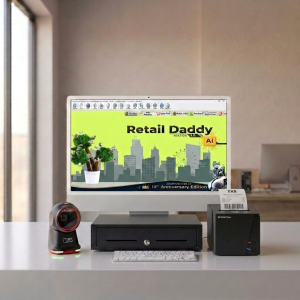
A printer is only half the setup — the billing software driving it matters just as much. This is where Retail Daddy billing software fits in well with the RP3200 Plus. It connects to thermal receipt printers like this one over USB or Ethernet without requiring a complicated driver chain, which saves a lot of back-and-forth during setup.
Retail Daddy is built around Indian retail requirements — GST-compliant billing, barcode scanning, and inventory syncing baked in rather than bolted on. For a kirana store, supermarket, pharmacy, or restaurant that wants a fast counter without hiring an IT person to keep it running, the RP3200 Plus paired with Retail Daddy is one of the more sensible combinations I’ve seen work reliably day to day. It’s not the only billing software that’ll talk to this printer, but it’s one of the better-suited options if GST-ready, no-fuss billing is what you’re after.
Pros and Honest Limitations
What works well: fast print speed that genuinely reduces queue time, solid build quality with a long-rated print head and cutter life, flexible connectivity for single or multi-counter setups, and no ink costs to worry about.
What to keep in mind: thermal receipts fade over time, especially if stored somewhere hot or in direct sunlight — not ideal if customers need to keep receipts for warranty claims months later. It’s also strictly a receipt printer, not a general-purpose one, so don’t expect it to replace your office inkjet or laser printer.
Frequently Asked Questions
Does the RP3200 Plus work with Android POS apps, or only Windows?
It connects via USB, Serial, or Ethernet, and most Android POS apps that support ESC/POS commands will work with it, though driver support is generally more mature on Windows.
How long does the thermal paper roll last?
That depends entirely on your transaction volume and receipt length, but with the 80mm roll width standard, most stores restock every few days to a couple of weeks during regular business.
Can I print my shop logo on receipts?
Yes, if you’re using marked or pre-printed paper rolls, or if your billing software supports printing a logo image at 203 DPI resolution.
Is onsite support included with the warranty?
The printer comes with a 1-year manufacturer warranty; some sellers additionally offer onsite support, so it’s worth checking with whoever you’re buying from.
The Bottom Line
If you’re setting up or upgrading a retail billing counter and want something fast, reliable, and not overly complicated to maintain, the TVS RP3200 Plus holds up well against that brief. Pair it with billing software like Retail Daddy that’s built for GST-compliant Indian retail, and you’ve got a counter that won’t slow your customers down — or your Saturday evenings.
Leave a Reply