
- Version 1
- Download 1
- File Size 4.7 MB
- File Count 1
- Create Date January 7, 2026
- Last Updated August 28, 2026
Brother QL-700 Label Printer
The Brother QL-700 is a direct thermal label printer designed to quickly produce labels without ink or toner — making it cost-effective and easy to maintain. You connect it to a computer via USB and print labels on demand.
Key Features
Thermal Printing (No Ink/Toner)
-
Uses direct thermal technology, meaning it prints by heating specially coated label paper — no cartridges required.
Fast Label Production
-
Print speed: up to 93 labels per minute (standard address labels).
-
Good for high-volume tasks like mailing, inventory tags, barcodes and file organization.
Label Size & Cutting
-
Maximum label width: ~62 mm; height: up to ~59 mm.
-
Printer can make signs or banners up to 1 m long using continuous media.
-
Built-in automatic cutter trims each label cleanly after printing.
High-Quality Output
-
Resolution: up to 300 × 600 dpi, ensuring crisp text, barcodes and simple graphics.
Connectivity & Software
-
USB connection connects easily to PC or Mac.
-
Includes P-touch Editor software for designing custom labels (text, barcodes, graphics).
-
Also has a “Plug & Label”/Editor Lite mode that lets you type and print labels without installing full software.
Brother QL-700 Label Printer: A Practical Guide for Retail Billing Counters
Walk into any busy retail store and you’ll notice something odd: the printer at the billing counter gets more daily use than almost any other piece of equipment in the shop, yet it’s usually the last thing owners think about when setting up their business. That’s a mistake. A slow or unreliable label printer creates a bottleneck right where customers are standing, waiting, and forming their last impression of your store. The Brother QL-700 has become a go-to choice for small and mid-sized retailers precisely because it removes that bottleneck without demanding much attention or maintenance.
I’ve set this printer up at pharmacy counters, boutique checkout desks, and small warehouse shipping stations, and the experience is consistent: plug it in, install the driver, and within about ten minutes it’s printing usable labels. That kind of predictability matters more than people expect when they’re comparing specs on paper.
What the Brother QL-700 Actually Offers
The QL-700 is a direct thermal label printer, which means there’s no ink cartridge or toner to buy, refill, or dry out. Labels are printed using heat applied to specially coated Brother DK rolls, so the only consumable you’re ever managing is the label roll itself. That alone eliminates one of the most annoying recurring costs of running a billing counter.
On the performance side, it prints at up to roughly 93 labels per minute, which sounds like a marketing number until you’re actually ringing up a queue of customers during a weekend rush. It connects over USB rather than Wi-Fi or Bluetooth, which is a deliberate trade-off: you lose some flexibility in where you can place the printer, but you gain a rock-solid, lag-free connection that doesn’t drop mid-print the way some wireless label printers do.
It ships with Brother’s P-touch Editor software, which is fine for basic label design, but most retailers end up printing labels directly from their billing or inventory software instead of designing them manually every time. That’s really where the printer starts to earn its keep.
Where It Actually Gets Used in a Retail Setting
In practice, the QL-700 tends to handle three jobs at once in a small store:
- Billing counter receipts and barcode labels — printed the moment a sale is rung up, so items leave the store correctly tagged.
- Inventory and shelf labeling — batches of price or SKU labels printed ahead of a stock refresh, rather than one at a time.
- Compliance and product labeling — MRP, batch number, or expiry labels, which matter a lot for pharmacies and grocery stores in particular.
None of these are exotic use cases, and that’s the point. The printer isn’t trying to be clever — it’s trying to be dependable for the same handful of tasks, over and over, hundreds of times a day.
Setting It Up With a Billing System
Hardware is only half the story. A label printer is only as useful as the software sending it print jobs, and this is usually where retailers get tripped up — either the billing software doesn’t talk to the printer cleanly, or it can generate an invoice but not a proper barcode label to go with it.
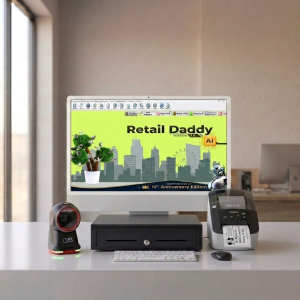
This is where pairing the QL-700 with Retail Daddy billing software makes a real difference. Retail Daddy is built with small and medium retail operations in mind, and its label and barcode printing module recognizes the QL-700 without the usual back-and-forth of driver troubleshooting. A few things stand out about the combination:
- GST-compliant invoicing that also triggers barcode label printing in the same workflow, so billing and labeling aren’t two separate steps.
- Inventory sync — when stock is added or repriced in Retail Daddy, label batches can be printed straight to the QL-700 without re-entering data.
- POS compatibility that keeps the counter moving during peak hours, since the printer isn’t waiting on a slow handoff between systems.
- Simple setup for non-technical staff, which matters more than it sounds like it should when you’re training seasonal or part-time counter staff.
For a pharmacy, boutique, or small grocery store, that combination — Retail Daddy handling the billing and inventory logic, the QL-700 handling fast and reliable label output — covers most of what a counter needs without stitching together three different tools.
Pros and Cons, Honestly
Strengths
- Fast, consistent print speed even during busy periods
- No ink or toner costs — direct thermal printing keeps running costs predictable
- Reliable USB connection with minimal setup friction
- Integrates cleanly with billing software like Retail Daddy for barcode and invoice-linked labels
Limitations
- No standalone or battery-powered use — it needs to stay tethered to a computer, so it’s not built for mobile or field labeling
- Genuine Brother DK label rolls cost more than generic thermal paper, and off-brand rolls can affect print quality or jam more often
Neither of these is a dealbreaker for a fixed billing counter, but they’re worth knowing before you buy, especially if you were picturing something more portable.
Who Should Actually Buy This
The QL-700 makes the most sense for small to mid-sized retail businesses with a fixed billing counter — think boutiques, pharmacies, small grocery or convenience stores, and stockrooms that need batch labeling. If your business needs labels printed on the move, at multiple locations, or without a nearby computer, a mobile or Bluetooth-enabled printer will probably serve you better. But for the classic setup — a counter, a computer, and a steady stream of customers — it’s hard to find a printer this reliable at this price point.
The Bottom Line
The Brother QL-700 isn’t flashy, and it isn’t trying to be. It does one job — printing labels fast and reliably — and does it well enough that most retailers stop thinking about it entirely once it’s set up, which is honestly the highest compliment a piece of counter equipment can get. Paired with Retail Daddy billing software to handle the invoicing, GST compliance, and inventory side, it becomes less of a standalone gadget and more of a quiet, dependable part of the billing counter’s daily rhythm. For small and medium retailers looking to speed up checkout without adding complexity, that combination is worth serious consideration.
Leave a Reply