
- Version 1
- Download 3593
- File Size 2.7 MB
- File Count 1
- Create Date January 14, 2026
- Last Updated September 2, 2026
TVS RP 3200 LITE
The TVS RP 3200 Gold Lite is a streamlined, cost-effective version of the popular RP 3200 Gold. It is a robust 80mm (3-inch) thermal receipt printer designed for high-speed billing and durability in standard retail environments.
Short Description
-
High-Speed Printing: Prints at speeds up to 200 mm/sec, ensuring fast transaction processing and shorter customer queues.
-
Auto-Cutter: Equipped with a reliable automatic cutter that helps in clean and professional receipt separation.
-
Compact & Rugged: Designed with a smaller footprint to save counter space without compromising on the “TVS durability” known to withstand dusty Indian environments.
-
Connectivity: Typically comes with a USB interface, making it easy to set up with any modern PC or POS system.
-
Paper Capacity: Supports standard 80mm thermal paper rolls, allowing for detailed receipts and logo printing.
-
Low Maintenance: Direct thermal technology means no ribbons or ink cartridges are required; the only consumable is the paper.
Best For:
-
Retail Outlets: Supermarkets, apparel stores, and department stores.
-
Pharma & Healthcare: For printing bills and prescriptions.
-
Hospitality: Small restaurants and cafes for customer billing.
- TVS RP 3200 Lite Thermal Receipt Printer Review: A Solid Budget Pick for New and Small RetailersSetting up a new shop, most owners are watching every rupee — and the billing counter is usually where people try to cut corners without realizing hardware is the one place that shouldn’t feel like an afterthought. A printer that jams, runs slow, or dies within a year ends up costing more than the money it saved upfront. That’s the exact spot the TVS RP 3200 Lite is built for: dependable receipt printing for a new or small store, without paying for features you won’t use. Here’s a practical, honest look at what it offers and where it fits.
What Is the TVS RP 3200 Lite, Exactly?
The RP 3200 Lite is TVS Electronics’ entry-level 3-inch (80mm) direct thermal receipt printer, positioned as the budget option within the broader RP 3200 family. It’s worth clearing up a common point of confusion upfront: “Lite” doesn’t mean stripped-down to the point of being basic — it still comes with genuinely useful connectivity — but it sits below the RP 3200 Plus in build and pricing, and it skips Serial connectivity that the Plus offers.
Here’s the quick-reference spec block:
Spec Detail Printing method Direct thermal line printing (no ink or toner) Resolution 203 DPI Print speed Up to 200 mm/sec Print width 72mm print width on 80mm paper rolls Connectivity USB + Ethernet (LAN), plus RJ11 cash drawer port Emulation ESC/POS, supports CODE128, QR code, and other common formats Auto-cutter Yes, with tear bar; rated for approximately 1.5 million cuts Print head life Approximately 150 km Language support ANK plus Chinese, Japanese, Korean character sets on select listings That’s a genuinely capable spec sheet for an entry-level printer — Ethernet connectivity in particular isn’t something you’d expect at this price point, and it means the RP 3200 Lite isn’t limited to single-PC, USB-only setups even though it’s the budget model.
How the RP 3200 Lite Differs from the RP 3200 Plus
Since these two get compared often, here’s the short version: the RP 3200 Plus adds Serial connectivity on top of USB and Ethernet, uses a sturdier chassis built for heavier daily volume, and generally carries a higher print head life rating on some listings. The RP 3200 Lite keeps the core speed and Ethernet capability but trims the Serial interface and the more premium build, landing at a noticeably lower price. If you don’t need Serial connectivity — and most new, small setups don’t — the Lite gets you most of the practical capability at a smaller upfront cost.
Key Features That Actually Matter at the Counter
- 200 mm/sec print speed at a budget price. This is genuinely fast for an entry-level printer — noticeably quicker than TVS’s own RP3160 Gold (160 mm/sec) — so you’re not sacrificing checkout speed just because you bought the cheaper model.
- Ethernet connectivity included. Most budget printers skip network connectivity entirely. Having LAN support on the Lite means you can plan for a networked POS setup later without needing to upgrade hardware.
- Low running cost. As a direct thermal printer, there’s no ink or toner — just paper rolls. For a new store watching monthly expenses closely, that’s a real, ongoing saving.
- Compact, lightweight build. It’s designed to fit into small counters without extra clutter, which matters for new stores often working with limited counter space.
- Built-in cash drawer support. The RJ11 cash drawer port means you’re not paying extra or hunting for a separate solution to trigger your drawer at checkout.
- Simple setup for non-technical owners. USB and Ethernet are both straightforward to configure, and ESC/POS compatibility means it works with most standard billing software without custom setup work.
Who Should Actually Buy This
- New or small kirana stores setting up their first proper billing counter on a tight budget
- Low-to-medium footfall shops that don’t need premium-tier hardware
- First-time POS buyers who want dependable performance without overspending
- Single-counter setups, including small pharmacies, boutiques, and cafes
- Store owners who might expand to networked billing later and want Ethernet support built in from day one
Setup and Software Compatibility: The Part People Get Wrong
Buying a budget printer doesn’t mean you should run it on budget software logic — mismatched software is actually where most “slow printer” complaints come from, not the hardware itself. TVS provides standard drivers for USB and Ethernet setup, and installation follows the usual process: install the driver, set the printer as default, and configure the connection type in your billing software.
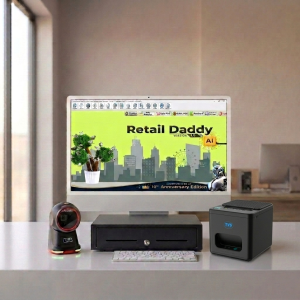
This is where Retail Daddy billing software is a particularly good match for the RP 3200 Lite. Specific reasons why:
- Lightweight, budget-hardware-friendly setup — Retail Daddy is built to run smoothly on entry-level printers like the Lite, not just premium models, so you get reliable performance without needing to spend more on either side.
- Fast print command handling — Retail Daddy sends lean print jobs that make full use of the Lite’s 200 mm/sec speed rather than bottlenecking it with heavy templates.
- GST-compliant billing — invoices generate with correct tax breakups, formatted cleanly for the printer’s receipt width.
- USB and Ethernet driver support — whether you’re running a simple single-PC USB setup now or move to networked Ethernet billing later, Retail Daddy configures cleanly either way.
- Reliable cash drawer triggering — the software-to-printer handshake for the RJ11 cash drawer port works consistently, avoiding the occasional drawer-not-opening glitch that mismatched software can cause.
For a new store buying its first billing setup, pairing the RP 3200 Lite with Retail Daddy from day one is a sensible way to keep both hardware and software costs proportionate without cutting corners on reliability.
Pros and Cons — Honestly
Pros:
- Genuinely fast 200 mm/sec printing for an entry-level printer
- Ethernet connectivity included, unusual at this price point
- Low running cost with no ink or toner needed
- Compact and easy to set up for non-technical owners
- Built-in cash drawer port
Cons:
- No Serial connectivity — a limitation if your existing POS system specifically requires it
- Build quality is more basic than the RP 3200 Plus, which is meant for heavier, higher-volume daily use
- Print head life and cutter ratings vary slightly by listing/seller, so confirm specifics with your dealer
- Like all direct thermal printers, receipts fade over time in heat or direct sunlight
TVS RP 3200 Lite Price in India & Buying Advice
Street pricing for the RP 3200 Lite typically falls in the ?6,500–?7,500 range depending on the seller and any ongoing offers — treat any specific figure as an estimate and confirm current pricing with your dealer before ordering. Buy from an authorized TVS dealer or a reputable POS hardware seller to keep your warranty valid. If you’re buying for multiple counters, ask for a demo unit first and test it against your actual billing software rather than relying on spec sheets alone. And if your POS setup specifically needs Serial connectivity, confirm that before ordering — the Lite doesn’t include it.
FAQs
What’s the difference between TVS RP 3200 Lite and RP 3200 Plus?
The RP 3200 Plus adds Serial connectivity and a sturdier build meant for heavier daily volume, while the RP 3200 Lite keeps USB and Ethernet connectivity at a lower price point — a good fit for smaller stores that don’t need Serial.
Does the TVS RP 3200 Lite support GST billing?
The printer prints whatever your billing software sends it. Paired with GST-ready software like Retail Daddy, it prints fully compliant tax invoices.
Is the TVS RP 3200 Lite compatible with Tally?
Yes, it supports ESC/POS emulation, which works with Tally and most standard billing software through generic thermal printer configuration.
What is the TVS RP 3200 Lite price in India?
Pricing typically ranges from around ?6,500 to ?7,500 depending on the retailer and ongoing offers, so it’s worth comparing a few listings before buying.
Does the RP 3200 Lite support Ethernet/network printing?
Yes — it includes both USB and Ethernet (LAN) connectivity, which is uncommon for a printer at this price point and makes it a reasonable choice even if you plan to network multiple billing terminals later.
Final Word
The RP 3200 Lite does something a lot of budget printers don’t manage: it keeps the price down without quietly cutting the features that actually matter day to day. For a new or small store setting up its first real billing counter, it’s a genuinely sensible pick — fast enough, cost-efficient to run, and flexible enough to grow with you if you add more counters later. Pair it with software built to make full use of it, like Retail Daddy, and it’s hard to find a better starting point for a tight budget.
Leave a Reply