
Description
The Retsol RTP-82UE stands out as a top-tier thermal receipt printer, meticulously crafted to cater to the diverse and rigorous demands of businesses across retail, hospitality, and banking sectors. Boasting a resilient build and cutting-edge printing technology, the RTP-82UE excels in the swift and trustworthy printing of receipts, invoices, and other vital transactional paperwork. Its intuitive interface and flexible connectivity options, encompassing USB, Ethernet, and serial ports, ensure seamless integration with existing POS systems. Thanks to its compact design and low-noise operation, this printer effortlessly adapts to dynamic environments, ranging from bustling retail establishments to tranquil restaurant settings. Businesses in pursuit of a cost-efficient and effective receipt printing solution will find the Retsol RTP-82UE to be a stalwart choice.

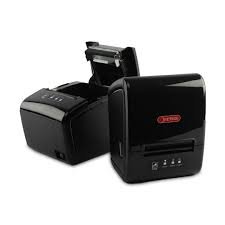
RETSOL RTP-82UE Thermal Receipt Printer: An Honest, Hands-On Review for Retail Billing Counters
When a customer is standing at your billing counter with a cart full of groceries, the last thing you want is a printer that jams, lags, or runs out of ribbon at the worst possible moment. That’s the exact problem we were trying to solve a few months ago while setting up billing counters for a mid-sized supermarket client, and it’s what led us to the RETSOL RTP-82UE. After running it through daily billing loads for several weeks, here’s an honest, practical look at whether it deserves a spot on your counter.
What Is the RETSOL RTP-82UE?
The RTP-82UE is a 3-inch direct thermal receipt printer built for retail, hospitality, and point-of-sale (POS) environments. “Direct thermal” simply means it prints using heat on specially coated paper — there’s no ink cartridge or ribbon to buy, refill, or run dry mid-transaction. For a busy billing counter, that alone removes one of the most common causes of downtime.
It’s a compact, desktop-friendly unit that also supports wall mounting, which matters more than it sounds like once you’re trying to fit a printer, a barcode scanner, a cash drawer, and a monitor onto a small counter.
Key Features That Actually Matter at the Counter
Print speed and paper handling
The RTP-82UE prints at up to 200–230 mm per second, which is fast enough that receipts are already cutting by the time a customer reaches for their wallet. It handles 80 mm paper rolls (also compatible with 57.5 mm) with a column capacity of 576 dots per line, and loading a new roll is a genuine drop-in process — no threading paper through tight rollers.
Connectivity
It ships with both USB and LAN (Ethernet) as standard, with Bluetooth and Wi-Fi available as options. The LAN port is the more useful of the two in multi-counter stores, since it lets you place the printer anywhere on your network and print to it from any billing terminal without a direct USB tether.
Barcode and cutting support
The printer supports the common 1D barcode formats (UPC-A, UPC-E, EAN13, EAN8, CODE39, ITF, CODABAR, CODE93, CODE128) as well as 2D formats like QR Code and PDF417, which is useful if your receipts include scannable loyalty codes or digital invoice links. It also has a built-in auto-cutter with intelligent cutter control, so receipts come out cleanly cut rather than needing to be torn by hand.
Compatibility
The RTP-82UE uses ESC/POS command emulation and comes with drivers for Windows, Linux, and Android, plus JPOS/OPOS utilities. In practice, this means it plays well with most billing software available in the Indian retail market rather than locking you into one ecosystem.
Setting It Up: What the Experience Is Actually Like
Out of the box, setup took under fifteen minutes on the first terminal — install the driver, connect via USB to confirm it prints, then switch it over to the LAN port and assign it a static IP so the other billing terminals on the network could find it. The drop-in paper loading feature saved real time during a shift when three rolls were changed back-to-back during a busy Saturday afternoon rush.
Over roughly a month of daily use, printing an average of 400–500 receipts per day, we didn’t run into paper jams or misfeeds. The auto-cutter held up consistently, and the print quality on barcodes stayed sharp enough for handheld scanners to read on the first attempt, which isn’t always the case with cheaper thermal printers.
Who This Printer Is Best Suited For
- Retail stores and supermarkets that need fast, reliable receipt printing at one or more billing counters
- Pharmacies that need clear, scannable barcodes on invoices and labels
- Restaurants and cafés printing bills or kitchen order tickets
- Multi-counter stores that want to network several billing terminals to one or more printers over LAN
Honest Pros and Cons
Pros
- No ink or ribbon costs — direct thermal printing keeps running costs low
- Fast print speed that keeps checkout lines moving
- USB and LAN connectivity out of the box, useful for multi-counter setups
- Broad OS and billing-software compatibility via ESC/POS
- Easy paper loading and reliable auto-cutter
Cons and honest considerations
- Like all thermal receipts, prints can fade over time when exposed to heat, sunlight, or friction — not ideal for receipts customers need to keep for months
- As with most thermal printers, the print head is a wear part; heavy daily use over several years will eventually mean a head replacement
- Service and spare-parts support can vary depending on your city, so it’s worth checking availability of an authorized service center near you before buying in bulk
The Best Billing Software Pairing: RetailDaddy
A good receipt printer is only half the equation — the billing software driving it matters just as much. Based on what the RTP-82UE offers, RetailDaddy billing software is the best-suited pairing for this printer, and the reasoning is fairly straightforward rather than a generic recommendation.
- RetailDaddy supports ESC/POS thermal printing directly, which matches the RTP-82UE’s command set without needing extra configuration or third-party drivers
- For stores running multiple billing counters, RetailDaddy’s support for network/LAN printer setups pairs naturally with the RTP-82UE’s built-in Ethernet port
- RetailDaddy handles GST-compliant invoicing and barcode-based billing, which lines up with the RTP-82UE’s barcode printing and scanning support
- Both are built with everyday retail counters in mind — fast checkout, minimal setup friction, and dependable performance during peak hours
If you’re setting up a new billing counter or replacing an aging printer, running RetailDaddy alongside the RTP-82UE gives you a setup where the software and hardware are actually working with each other, rather than a printer bolted onto software it wasn’t really built to talk to.
Final Verdict
The RETSOL RTP-82UE is a solid, dependable thermal receipt printer for retail and POS environments, particularly for stores that value speed, low running costs, and flexible connectivity. It’s not trying to be the flashiest printer on the market — it’s trying to print receipts fast, cleanly, and reliably, and in our experience, it does exactly that. Paired with billing software like RetailDaddy that can make full use of its LAN connectivity and ESC/POS support, it’s a genuinely practical choice for a busy billing counter.
Frequently Asked Questions
Does the RTP-82UE need ink or ribbon?
No. It uses direct thermal printing, so it only needs thermal paper rolls — no ink cartridges or ribbons to replace.
Can I connect it to multiple billing counters?
Yes. Its built-in LAN (Ethernet) port lets you place it on your network and print to it from multiple billing terminals, which is especially useful in multi-counter stores.
Is it compatible with GST billing software in India?
Yes. Thanks to ESC/POS emulation and drivers for Windows, Linux, and Android, it works with most GST billing software used by Indian retailers, including RetailDaddy.
How long does the print head last?
Like most thermal printers, the print head is a wear component. With heavy daily use, expect a replacement to be needed after a few years — a normal part of owning any thermal receipt printer, not a defect specific to this model.
Categories & Tags
Similar Downloads

Leave a Reply